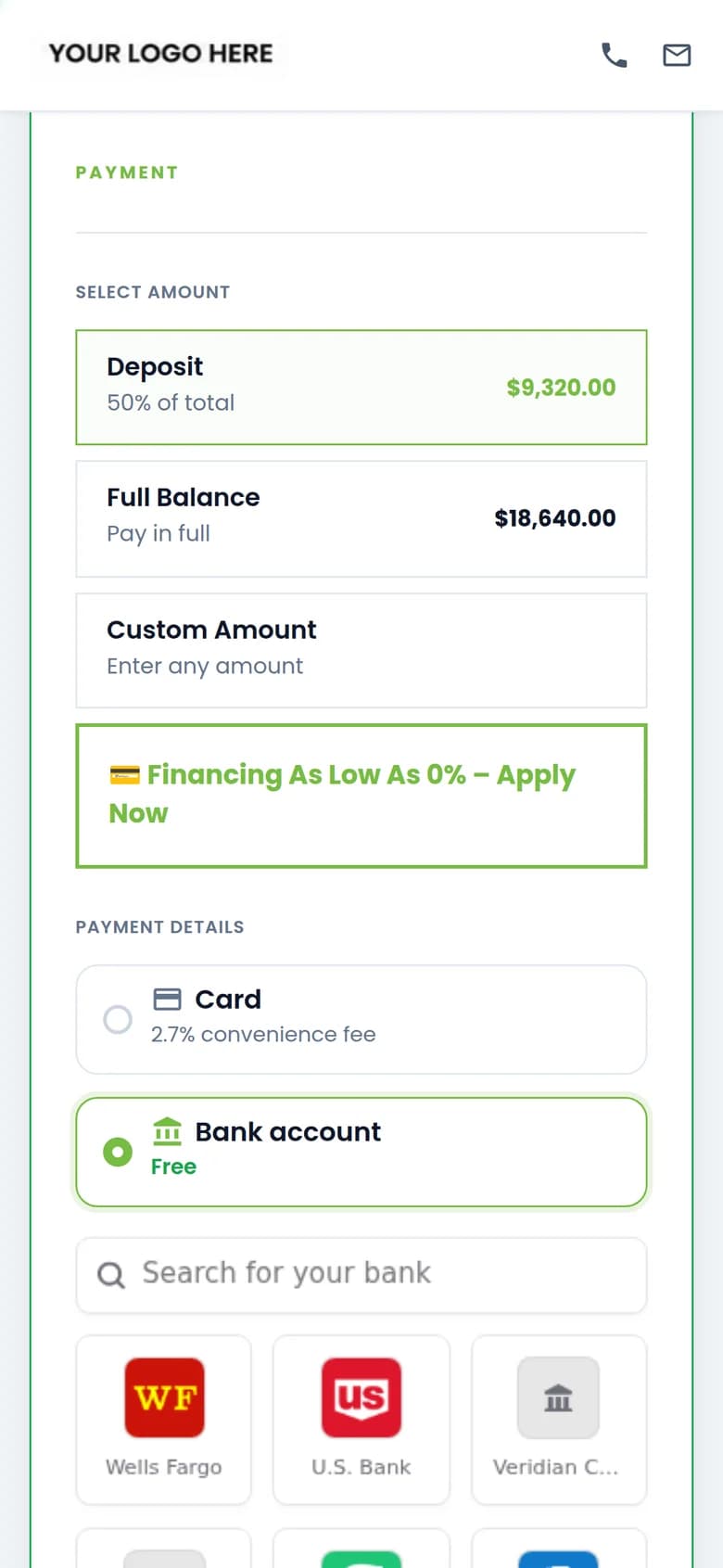


Turf invoices your customers pay from their phone.
The signed estimate becomes the invoice. Your customer taps the link and pays the deposit by card, bank transfer, Apple Pay or Google Pay, or finances the whole job, as low as 0%. QuickBooks keeps up on its own.
An example $18,640 backyard job, paid in TurfEstimator
$9,320
50% deposit, paid online from the invoice link
0%
financing offered right on the invoice, through your own lender
4 ways
to pay: card, bank transfer, Apple Pay and Google Pay
Turf jobs eat cash before they pay.
You buy the turf, the base and the dumpster before the crew shows up. Then the balance trickles in by check, weeks after the install.
01
Money out before money in
Thousands in materials go out before day one. The deposit should land before the truck rolls, not after.
02
Chasing checks
The job is done, the customer loves it, and you spend your evenings texting about the balance.
03
Typing it twice
The estimate lives in one place, the invoice in another and the books in a third, and every copy is a chance to get it wrong.
Built for turf companies: in TurfEstimator the signed estimate is the invoice, the customer pays from the same link, and every payment lands in your books.
From signed to paid, on one link.
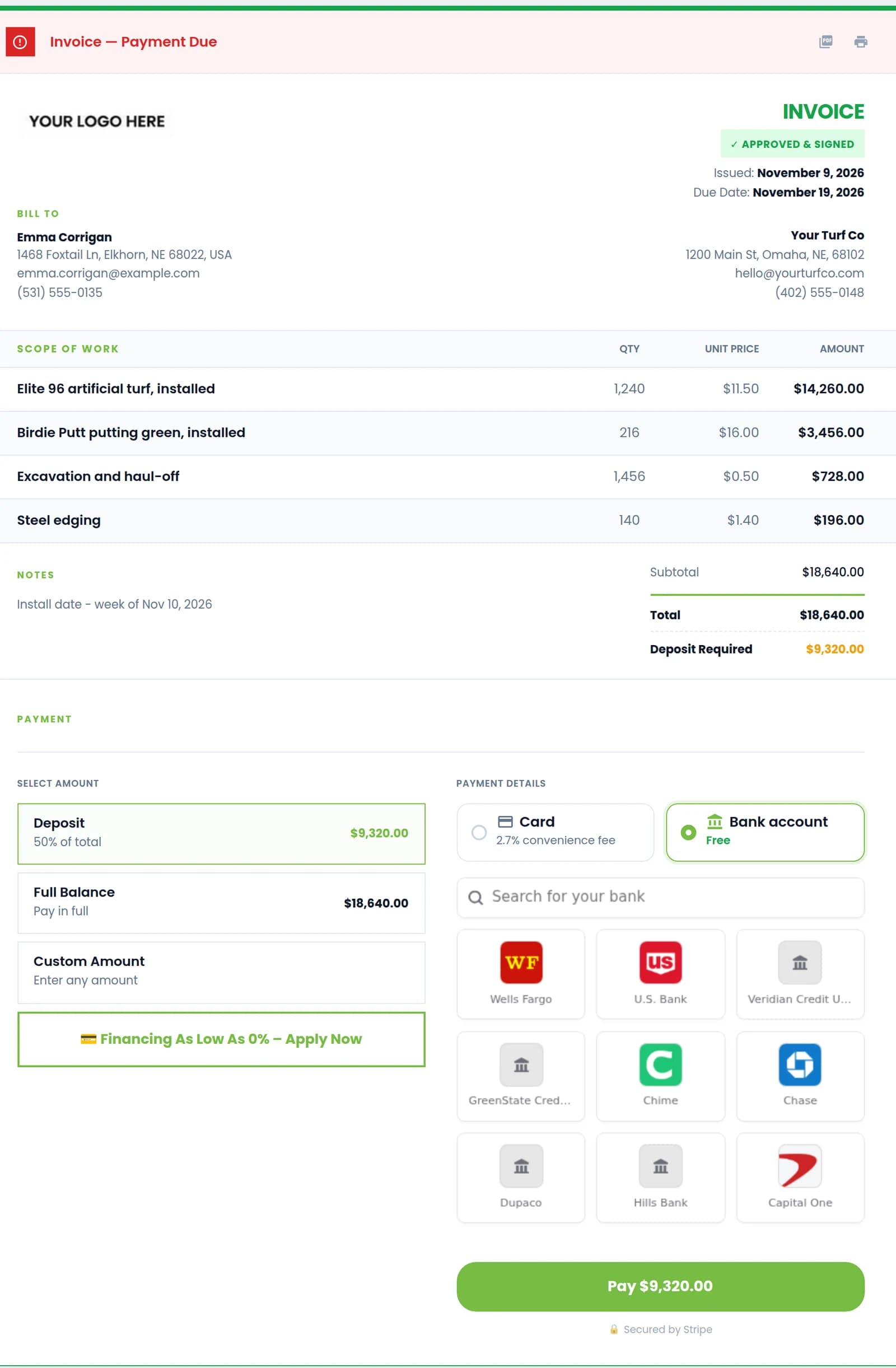
This is what your customer sees: their invoice, the deposit due, and every way to pay it.
- 1
They sign, it's invoiced
The moment the customer approves and signs the estimate, the invoice is ready. Nobody types a thing.
- 2
They pay, or they finance it
One tap from the invoice link: card, bank account, Apple Pay or Google Pay. Big job? They hit Financing As Low As 0% and apply right there.
- 3
Their bank, in a tap
Paying by bank? They pick Wells Fargo, Chase or their own bank from the list and log in. No routing numbers, and bank payments carry no card fee.
- 4
The balance, then the books
Send the balance when the job is done. Receipts go out on their own, and payments and the invoice sync to QuickBooks.
Everything between the signature and the bank
Financing as low as 0%
Put your lender right on the invoice with a big Financing As Low As 0% button. A $18,000 yard becomes a monthly payment, and big jobs stop stalling on price.
Invoices from the signed estimate
The approved estimate becomes the invoice, line for line, with no double entry.
Every way to pay
Card, bank account (ACH), Apple Pay and Google Pay, through your own Square or Stripe account.
Deposits, then balances
Ask for a percent or a set deposit up front and collect the rest when the job is done. Customers can pay in full or a custom amount too.
Pass the card fee on
Turn on a convenience fee for card payments if you want. Customers see it before they pay, and bank transfers stay free.
Synced to QuickBooks
Invoices and payments sync to QuickBooks Online, and you can import your products from it.
Also in TurfEstimator: turf estimating software, turf job costing, reports, and everything else
Before you send your first invoice.
Square and Stripe. You connect your own account, so the money goes straight to you.
Yes. They pay the deposit by card or bank transfer from the invoice link, then pay the balance later from the same link.
Yes. Apple Pay and Google Pay show up right on the invoice, so customers can pay in a tap from their phone.
Yes. Turn on a convenience fee for card payments and it's shown before they pay. Bank transfers have no fee.
Yes. Invoices and payments sync to QuickBooks Online, and you can import your products and services from it.
Yes, as low as 0%. Add your lender's application link and your own button text, like Financing As Low As 0% – Apply Now, and it shows right on every invoice. Customers apply in one tap, and big jobs close faster when the number they see is a monthly payment.
Your own. Use the lender you already work with or sign up with one, then paste in your application link. TurfEstimator puts it in front of every customer at the moment they're deciding.
Yes. Record cash and check payments by hand, and receipts go out on their own.
Yes. Save a customer's card on file for later, or take a quick sale with no estimate at all.
Invoicing and payments are on the Installer plan at $249 a month with a 30-day free trial. Your processor's own fees apply.
Still have a question? Talk to the people who built it.
Get paid before the truck rolls.
Deposits by link the day they sign, financing as low as 0% for the big jobs, balances the day you finish, and QuickBooks done for you. Built for turf installers.