

Turf business reports that show where the money is.
Which ads pay for themselves, what's still owed, what you owe in sales tax and how this year stacks up against last. 40 reports built for turf companies, ready the day you sign up.
An example turf company, this year in TurfEstimator
$1.15M
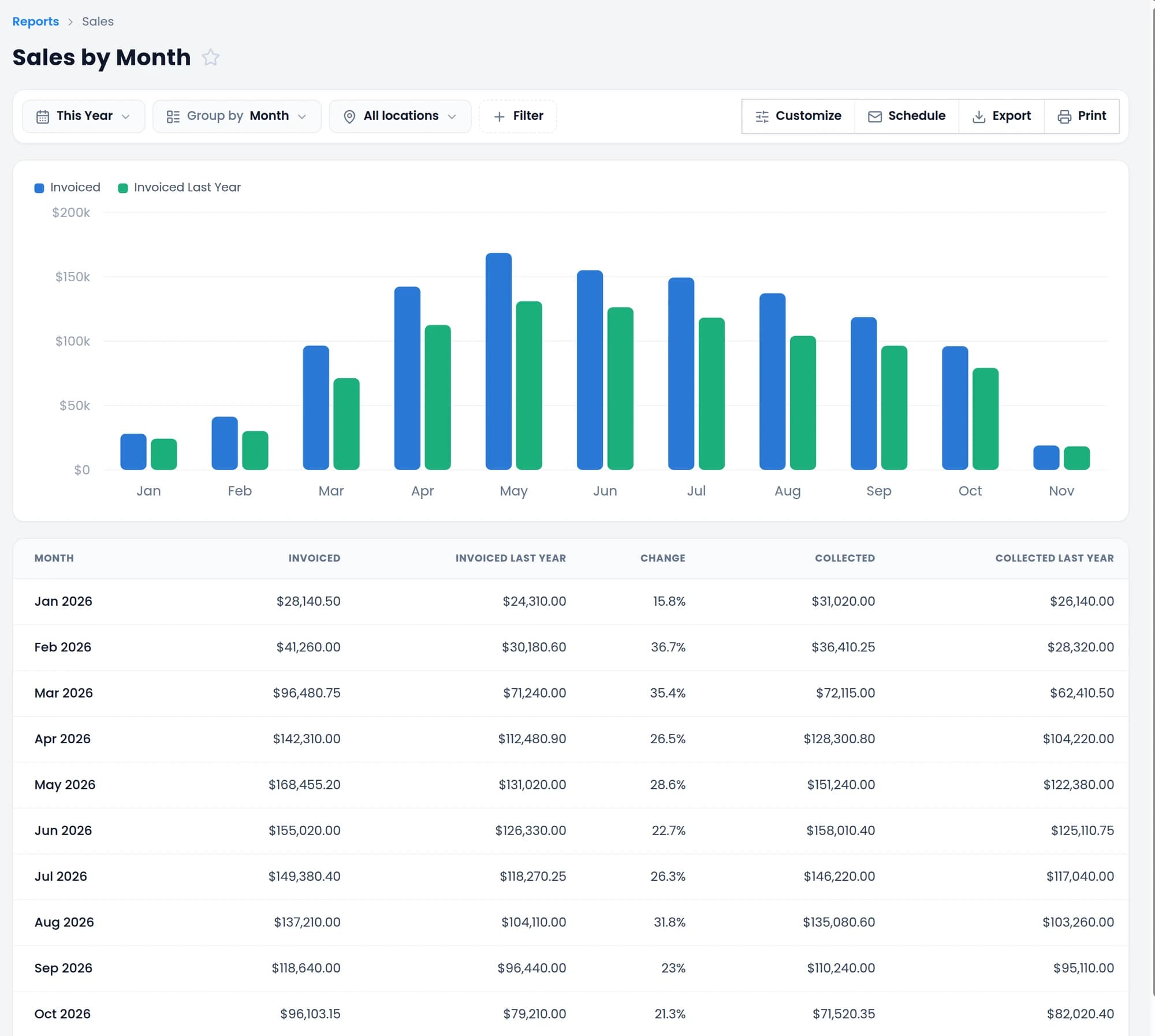
invoiced so far this year, up 26% on last year
$468K
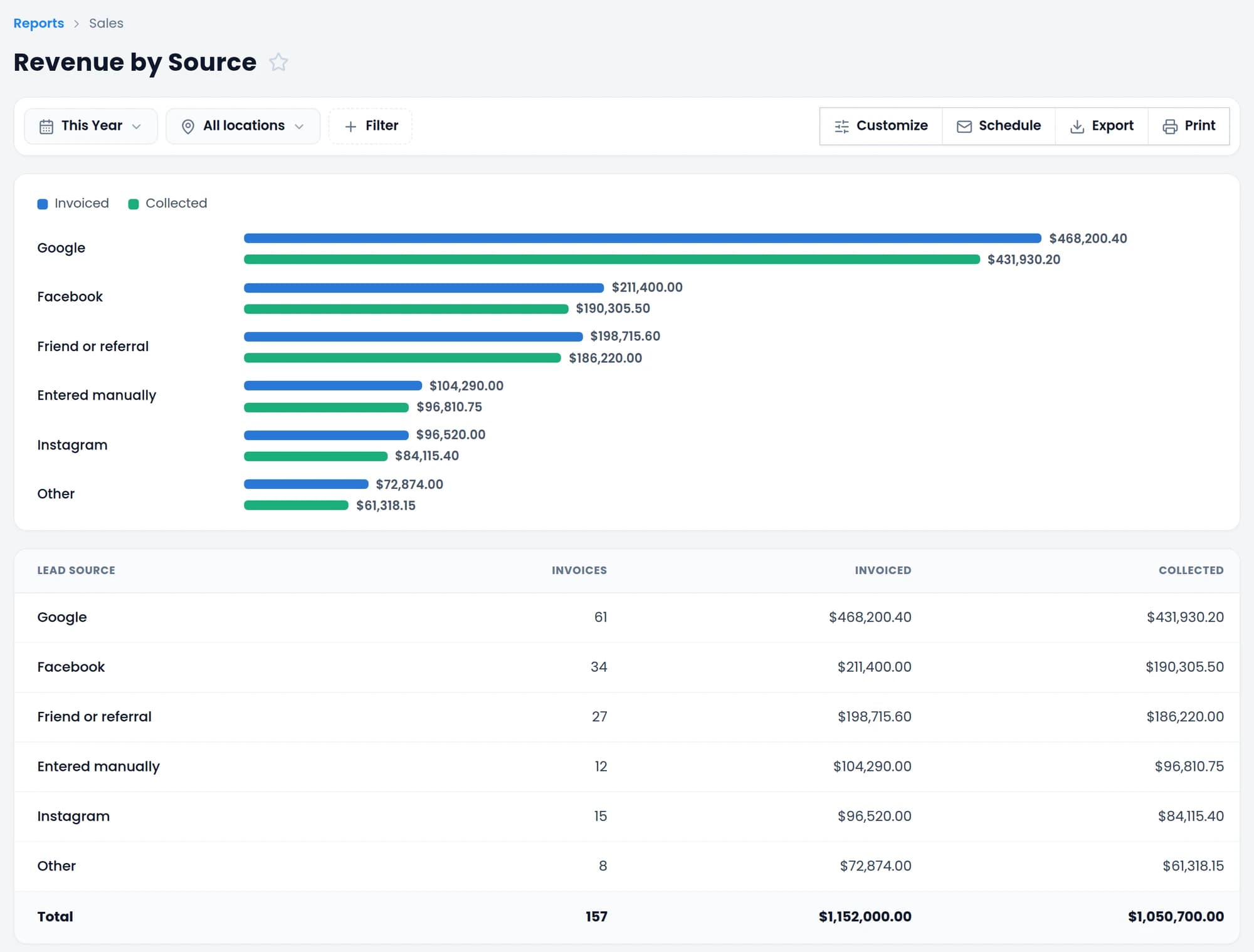
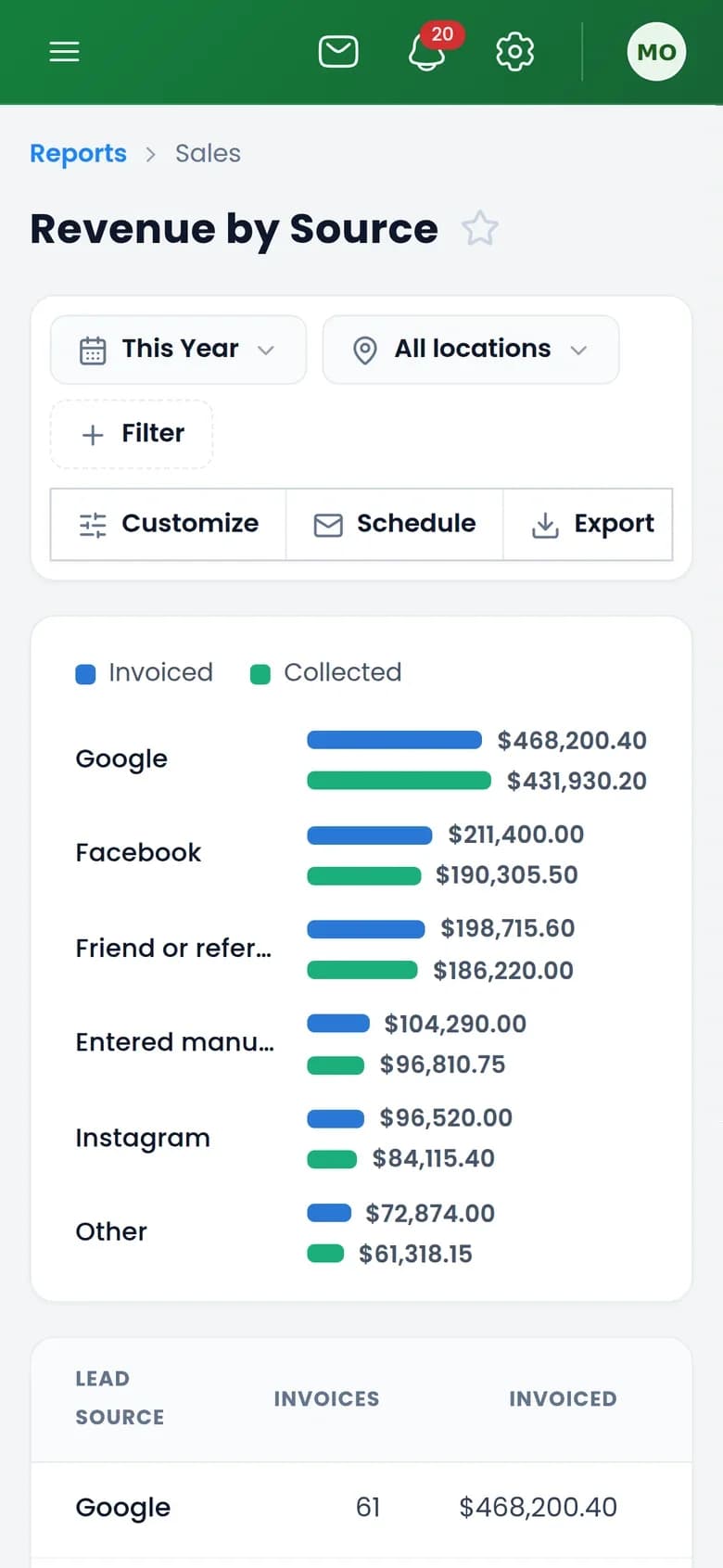
from Google leads, the top source by revenue
40
reports ready to go, from sales tax to square feet sold
You can't grow what you can't see.
Most turf owners find out how the year went at tax time. By then the slow month, the ad that never paid and the invoices nobody chased are already behind you.
01
Guessing which ads work
You spend on Google, Facebook and a home show, and nobody can say which one brought in the jobs that paid.
02
Money slipping through
Unpaid balances and half-collected deposits hide in a pile of invoices until someone goes looking.
03
Tax time panic
Sales tax by location and rate, pulled together from a year of invoices, the week it's due.
Built for turf companies: TurfEstimator already has every lead, invoice, payment and timesheet, so the answers are one click away.
This year against last, in one click.
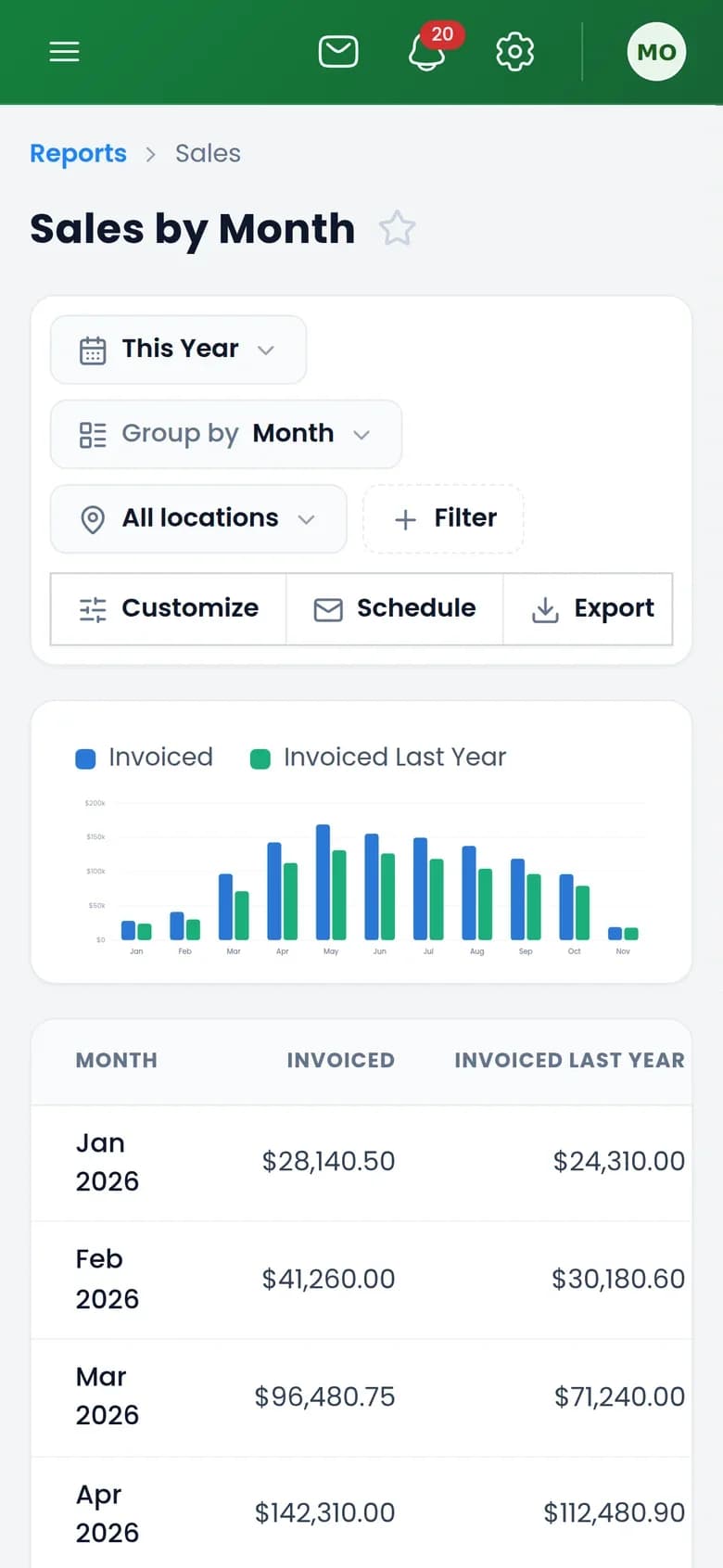
Sales by Month shows what you invoiced and collected every month next to the same month last year, so a slow spring or a record summer jumps right out.
- 1
Pick a report
Open any of 40 reports for sales, money, sales tax, items, customers, jobs, consultations and crew.
- 2
Slice it your way
Change the dates, group by month, week, rep or location, put last year beside it and filter to what you need.
- 3
Send it anywhere
Export to CSV, print it, or have it emailed to you every Monday morning.
Every number a turf company needs
Revenue by lead source
See which sources bring in invoices that actually get paid, not just leads: Google, Facebook, referrals and more.
Money and unpaid invoices
Revenue, payments received, deposits, refunds, customer balances and unpaid invoices by age.
Sales tax, done
Sales tax by location and rate, plus tax-exempt sales, ready for your accountant.
Square feet sold
Sqft sold and your real price per sqft, plus best-selling items and add-ons, so you know what to stock and what to push.
Sales reps and commission
Sales by rep, close rates, lost estimates and the commission each rep earned.
Crew and labor cost
Hours by job, overtime, attendance and labor cost from your timesheets.
Build your own with Turf AI
Describe the report you want and Turf AI builds it. Save it and share it with your team.
Emailed on a schedule
Any report, in your inbox daily, weekly or monthly, without logging in.
Also in TurfEstimator: job costing, invoices and payments, crew and time tracking, and everything else
All 40 reports, ready the day you sign up.
Every one runs on your real leads, invoices, payments and timesheets, filters by date, location and rep, exports to Excel and can be emailed to you on a schedule.
Sales
- Sales Summary
- Sales by Month
- Sales Reps
- Commission
- Sales by Location
- Revenue by Source
- Lost Estimates
- Estimate Options Chosen
- Open Estimates
Money
- Revenue
- Payments Received
- Deposits
- Unpaid Invoices
- Customer Balances
- Refunds
- Discounts Given
Customers
- Top Customers
- New vs Repeat Customers
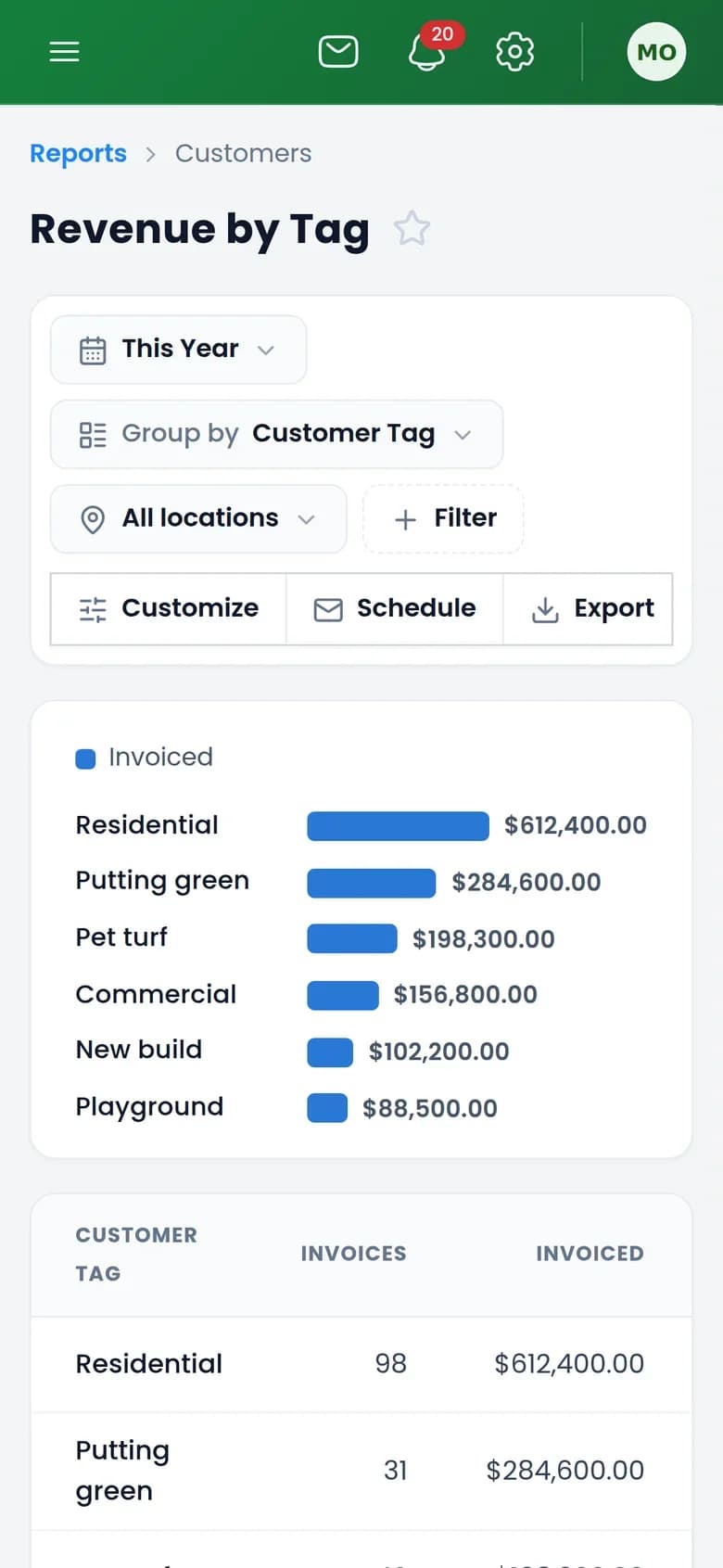
- Revenue by Tag
- Customers by City
- Customer List
Crew
- Timesheet Summary
- Hours by Job
- Attendance
- Labor Cost
- Overtime
Items
- Best-Selling Items
- Sales by Category
- Square Feet Sold
- Add-ons Sold
Jobs
- Jobs Completed
- Jobs by Status
- Upcoming Jobs
- Job Length
Sales Tax
- Sales Tax Summary
- Sales Tax by Rate
- Tax-Exempt Sales
Consultations
- Consultations Booked
- Booked to Won
- No-shows and Cancellations
Need one that isn't here? Customize any report, build your own from scratch, or just tell Turf AI what you want to see.
Before you run your first report.
Yes. Revenue by Source shows how much each lead source invoiced and collected, so you know which ads and referrals actually pay.
Yes. Sales by Month puts each month next to the same month last year, and any report grouped by month, quarter or year can show last year right beside it.
Yes. Sales Tax Summary, Sales Tax by Rate and Tax-Exempt Sales are ready to go, and each location keeps its own tax rate.
Yes. Unpaid Invoices groups what's owed by how old it is, and Customer Balances shows who owes what.
Yes. Customize any report or start from scratch, or describe what you want and Turf AI builds it. Save it and share it with your team.
Yes. Schedule any report by email, daily, weekly or monthly, or export it to CSV and print it.
No. Salespeople only see their own numbers. Owners and admins see everything.
Yes. Every report exports to a CSV file that opens right in Excel or Google Sheets, with every row, not just what fits on the screen. You can print any report too.
Yes. Square Feet Sold adds up the sqft on your invoices by product, month, location or rep, with what you actually got per sqft, so you know if your pricing is holding.
Yes. Set each rep's commission as a percent of the sale or the profit, and the Commission report shows what every rep earned, invoice by invoice, and what's been paid.
Yes. Sales Tax Summary and Sales Tax by Rate break out taxable sales and the tax collected for each location and rate, and Tax-Exempt Sales lists the rest.
Yes. Labor Cost and Hours by Job come straight from your timesheets, with overtime and attendance alongside.
Booked to Won shows how many consultations turned into signed jobs, and No-shows and Cancellations shows the ones that didn't.
Reports are on the Installer plan at $249 a month with a 30-day free trial.
Still have a question? Talk to the people who built it.
Know which jobs pay the best.
Revenue by job type, lead source, sales tax and crew hours, all from the same place you run the job. Built for turf installers.